Research
Competitors
A competitor, in Querywright, is a site that appears in Google's results for a search you care about. Querywright records who appears and what their pages say; whether they matter is your AI's reading and your call.
Querywright gives you two kinds of competitor evidence. Competitor domains are the sites that appear in the saved Google results for the searches in your plan, counted. Competitor page observations are facts read from a few of the pages ranking for a search your AI is deciding about. Both are observations. Neither is a recommendation, a ranking of rivals, or a judgment of quality.
What Querywright records
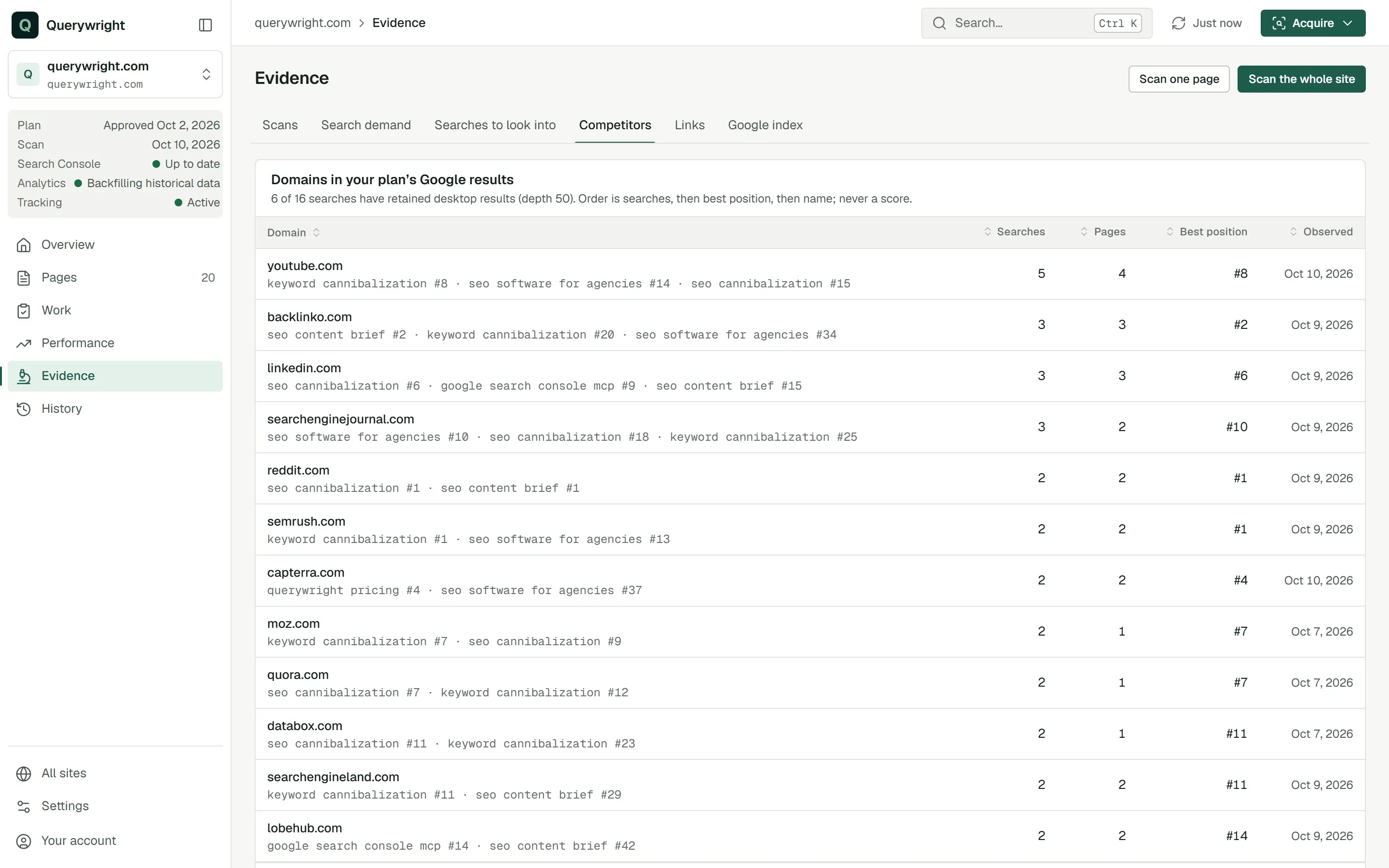
For competitor domains, from the newest saved desktop results of each search in your plan, with your own domain left out:
| Field | Meaning |
|---|---|
| Domain | A site that appears in those results. |
| Searches | How many of your plan’s searches it appears for, with the searches and its position in each. |
| Pages | How many of its pages appear. |
| Best position | Its highest position across those searches. |
| Observed | When the newest results it appears in were observed. |
The list is ordered by number of searches, then best position, then name. It is never a Querywright score.
For competitor page observations, your AI picks a saved desktop Google result and Querywright reads at most five of its organic pages, leaving out your own sites. The pages are selected mechanically from the result, not chosen for fit. For each page it records:
| Field | Meaning |
|---|---|
| Address and status | The page address, the final address after redirects and the HTTP status. |
| Title and meta description | As the page states them. |
| Headings | The page’s heading outline from its H1. |
| Text and structured data | The page’s text and the schema it declares, within fixed size limits. |
| Indexability and links | Its robots directives, canonical and links. |
| Limitations | What could not be read, and why. |
A page that cannot be read is recorded as unavailable with the reason. Reading the same competitor page again within 24 hours reuses the earlier read.
Where it shows in the App
Evidence › Competitors shows “Domains in your plan’s Google results”, with how many of the plan’s searches have saved desktop results. Below it, “Searches” lists each search with its market, the number of organic rows and whether a local pack was shown, and names any plan searches without saved results. When some searches have none, “Next steps” shows what fresh results would use, tagged You because it is your decision. With no plan in effect, the tab says so: domains are counted from the Google results of your plan’s searches.
Competitor page observations show in the suggested plan and the saved plan they informed, under “Observed competitors”, for each page: how many were observed of those selected, and each page’s address, title, description, status and headings. The plan record calls this “the saved decision basis” and adds that the observations “are factual observations, not endorsements or judgments of relevance”.
Who ranks for ‘water heater repair maryland’ right now, and what do their pages cover? Facts only; I’ll judge relevance.Does it use allowance?
- Reading the Competitors tab uses nothing.
- Competitor page observations use no included allowance: not Manual Google results, not Site Intelligence units and not one of your sites researched. Because of that, your AI can read them as part of an analysis you asked for without a separate yes.
- They need a saved Google result first. If a search has none, observing one uses Manual Google results, and your AI asks before it does.
- Competitor search gaps, the searches a competitor ranks for and you do not, come from a Site Intelligence snapshot and use one unit per competitor; they appear in Searches to look into under “Competitor gaps”.
See allowances.
Last updated