Research
Links
Querywright shows who links to your site and to the sites ranking beside you, as dated facts. It sends no outreach. Which sources are worth pursuing is your decision.
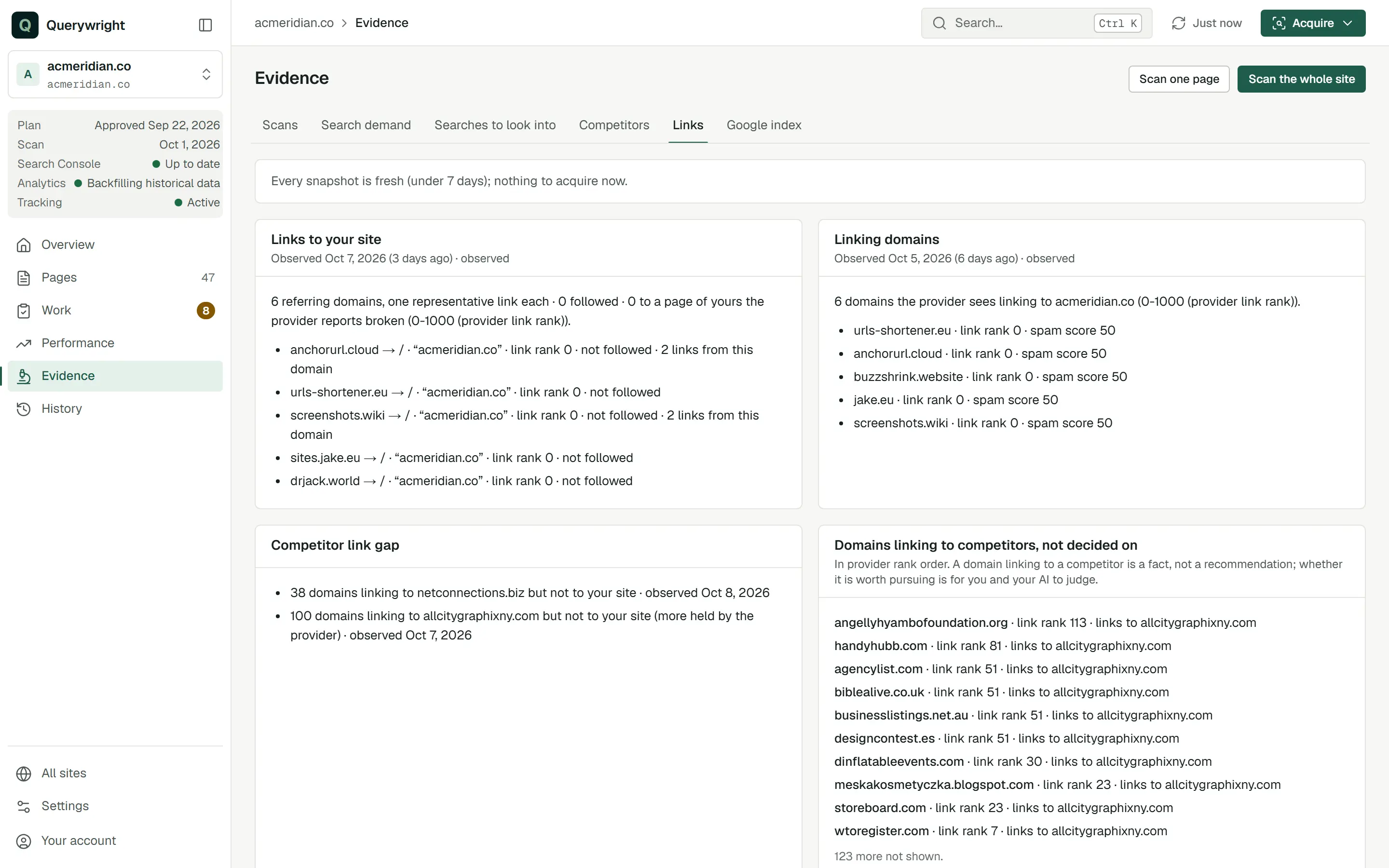
Links in Querywright are dated snapshots of link data from a link data provider: which domains link to your site, which link to a competitor and not to you, and whether a source you decided to pursue now links to you. A snapshot is the provider’s view on the day it was taken. It is not a complete list of every link on the web, and it is not a cause of anything that happens to your rankings.
What Querywright records
Each snapshot kind appears in the App under its own name:
| Snapshot | What it holds |
|---|---|
| “Links to your site” | Domains linking to your site, with one representative link from each: the linking domain, the page of yours it points to, the anchor text, the provider’s link rank, and whether the link is followed or points to a broken page. |
| “Linking domains” | Up to 100 domains linking to your domain, highest provider link rank first, each with its link rank and spam score as the provider states them. |
| “Competitor link gap” | Domains linking to a competitor you name but not to your site. One snapshot per competitor. |
| “Link sources you pursue” | For each source you chose to pursue, what the newest check found: “a live link is seen”, “only lost links are seen”, “no link is seen in the provider’s index”, “not determined (the answer was cut short)”, or “not checked yet”. |
| “Link authority” | On a page’s Evidence tab: the provider’s link rank for your domain and page, beside the range for the pages ranking with you. |
Every snapshot carries the date it was observed and its state. “Observed” means the provider returned data. “Some subjects had no provider data” means part of it is missing. When the provider holds nothing, the App says “the provider holds no data here (not zero, and not proof that none exists)”. Link rank and spam score are the provider’s attributes, not Querywright measurements or scores.
Where it shows in the App
Evidence › Links shows each snapshot with the date it was observed and how many days ago that was. Below them:
- “Link sources you pursue”, each with the date you decided, what the newest check found, and your words: “You said: …”.
- “Link sources you are not pursuing”, with the date you decided and whether a newer snapshot has seen the domain.
- “Domains linking to competitors, not decided on”, “in provider rank order”, with each domain’s link rank and the competitors it links to.
- “Links to pages the provider reports broken”, when there are any.
Getting new snapshots from the App is one explicit step. The page states how many Site Intelligence units new snapshots would use and how many remain, and that “Nothing is acquired until you confirm.” Press Investigate, read the dialog “Acquire link snapshots?”, and press Confirm and acquire or Cancel. When every snapshot is under seven days old, the page says there is nothing to acquire.
Who links to example.com, and where do competitors have links we don’t? Don’t contact anyone; just show me the facts.Does it use allowance?
- Site Intelligence units (100 per billing period): one for each snapshot kind acquired, and one per competitor for a competitor link gap.
- A snapshot of the same kind and context under seven days old is reused and uses no unit.
- Reading saved snapshots uses nothing.
Your AI asks before it acquires, and the App’s Investigate dialog states the units first. The counts are in Settings → Usage; see allowances.
Last updated