Work
Writing briefs
A writing brief is what your AI writes from. Querywright issues it from the plan you approved and the evidence behind it, so the copy starts from facts rather than from memory.
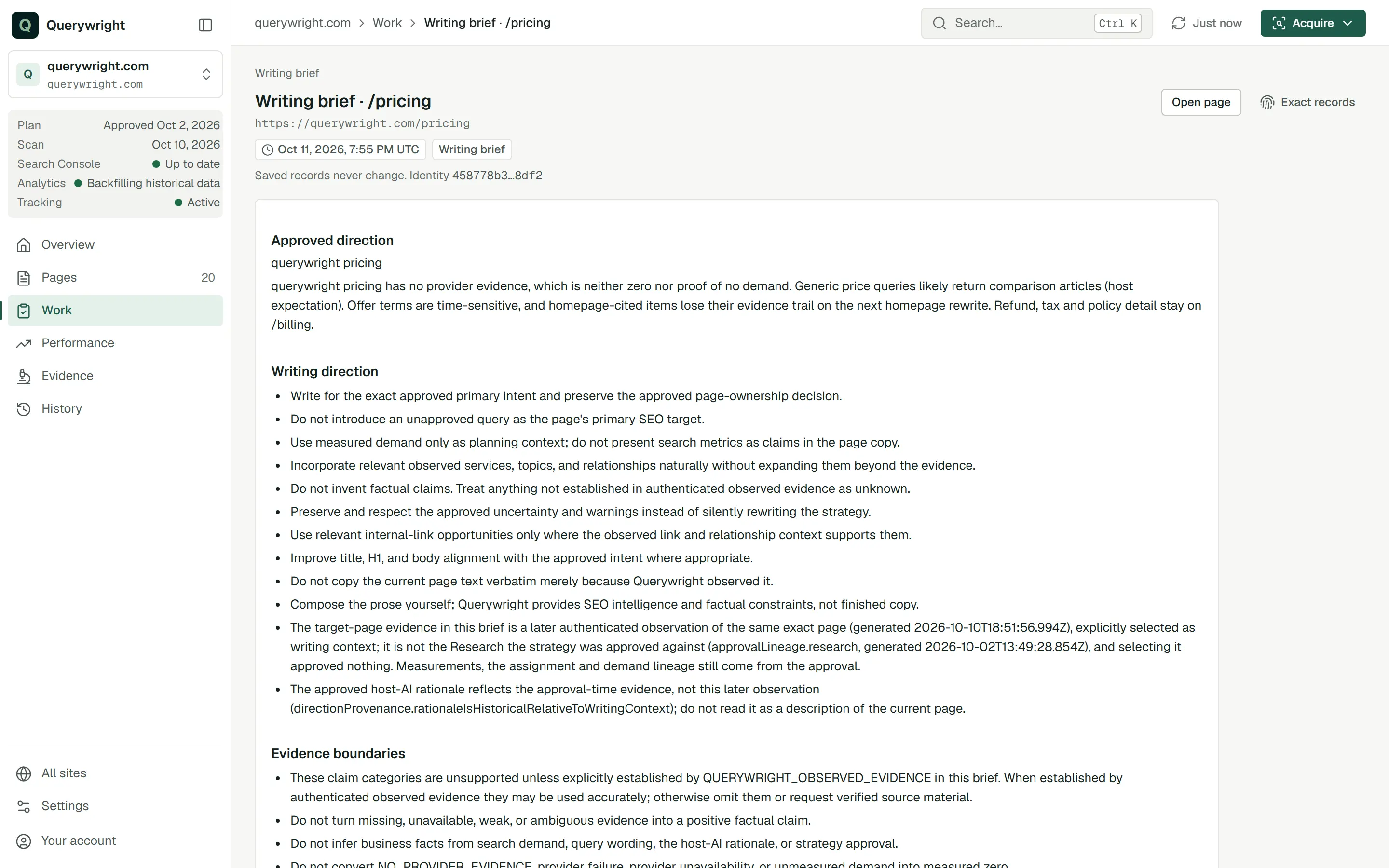
A writing brief is the saved set of instructions and evidence for writing one page under your plan. Querywright issues it when your AI asks, for a page in a plan you approved. It carries the direction you approved, the search demand behind it, what the scan observed on the page and the boundaries of that evidence. Your AI writes the copy from the brief; Querywright does not write anything. The brief and the editorial approach behind it are also described on the SEO content brief page.
What Querywright records
| Part of the brief | Meaning |
|---|---|
| Approved direction | The target search, supporting searches and any uncertainty from the plan you approved, unchanged. |
| Search demand | The measurements behind those searches, including the monthly figures, with their market and date. |
| Page evidence | For an existing page, what the scan observed: its text, headings, title, meta description and indexing directives. For a new page, evidence from elsewhere on your site instead, because the page does not exist yet. |
| Page relationships | Links into the page, navigation and related pages, when the scan observed them. When it did not, the brief says they are unavailable. |
| Writing direction | Instructions for the copy, shown under “Writing direction” on the saved brief. |
| Evidence boundaries | What the evidence does and does not support, shown under “Evidence boundaries”. Statements outside them, such as prices, availability, guarantees or service areas, stay out of the copy unless you supply them. |
| Publishing rules | Only rules you state, such as a title length limit. Without one, the brief makes no length judgment. |
Existing page or new page
For an existing page, the brief works from the page as the scan saw it, and your AI keeps the meaning of what is already there, such as indexing directives and structured data, unless the plan changes it.
For a new page, the target is unobserved. The brief uses evidence from your site’s other pages, and that evidence does not show what the new page will contain, where it will sit in your navigation or which pages will link to it. Your AI writes as though none of that is known yet, because it is not.
When a brief is issued again
A brief stays tied to the plan you approved and the scan it was approved on. That never changes. What can change is the page text the brief gives your AI to write from:
- If a newer scan of the page exists than the one in the brief, your AI should not treat the older text as the current page. It asks Querywright to issue the brief again with the newer scan as its writing context. Doing so approves, accepts and rechecks nothing.
- A brief can change only before you accept copy. Once copy is accepted, the brief beneath it is never replaced.
- If the evidence the plan itself was approved on needs to change, that is a new suggested plan and a new approval, not a new brief.
What it does not claim
Where it shows in the App
- On a page that is “In your plan” with no brief yet, the next-action button reads “Write copy in your AI”; your AI asks for the brief before writing.
- Once a brief exists and no copy has been accepted, the status reads “Writing brief ready”, the journey strip marks “Writing brief”, and the next-action button reads “Open writing brief”.
- The saved brief is a “Writing brief” record in History, and on the page’s History tab.
Write the copy for /services/plumbing from its writing brief. Show me the full page before anything is saved.What you decide
Does it use allowance?
No. Issuing a brief, reading it and issuing it again use no allowance. A new scan of the page counts toward Sites researched only if it is the first successful scan of that site in the period. See allowances.
Last updated